June 11th, 2026
New
New “Production Budget” column - Allows users to view budgeting progress of both planned and actuals from within the production list.
Improvements
Callsheet recipient lists now show more than 50 people, including both Team Members and External Recipients.
Invite Users now warns when an email belongs to an existing active, archived, or previously invited account.
Pagination in modal list views now appears at the bottom.
Assignment booking dates are now blocked outside the allowed booking range.
Expand-all rows control now shows a tooltip labeled “Expand all rows.”
Fixes
Production row lists now truncate overflowing content.
Callsheet Page Date inputs now keep a fixed width.
Callsheets now consistently include the PO number from the booking.
May 21st, 2026
🧰 What’s Fixed
Redesigned the row validation UI so it feels less aggressive
May 19th, 2026
🌟 What’s Improved
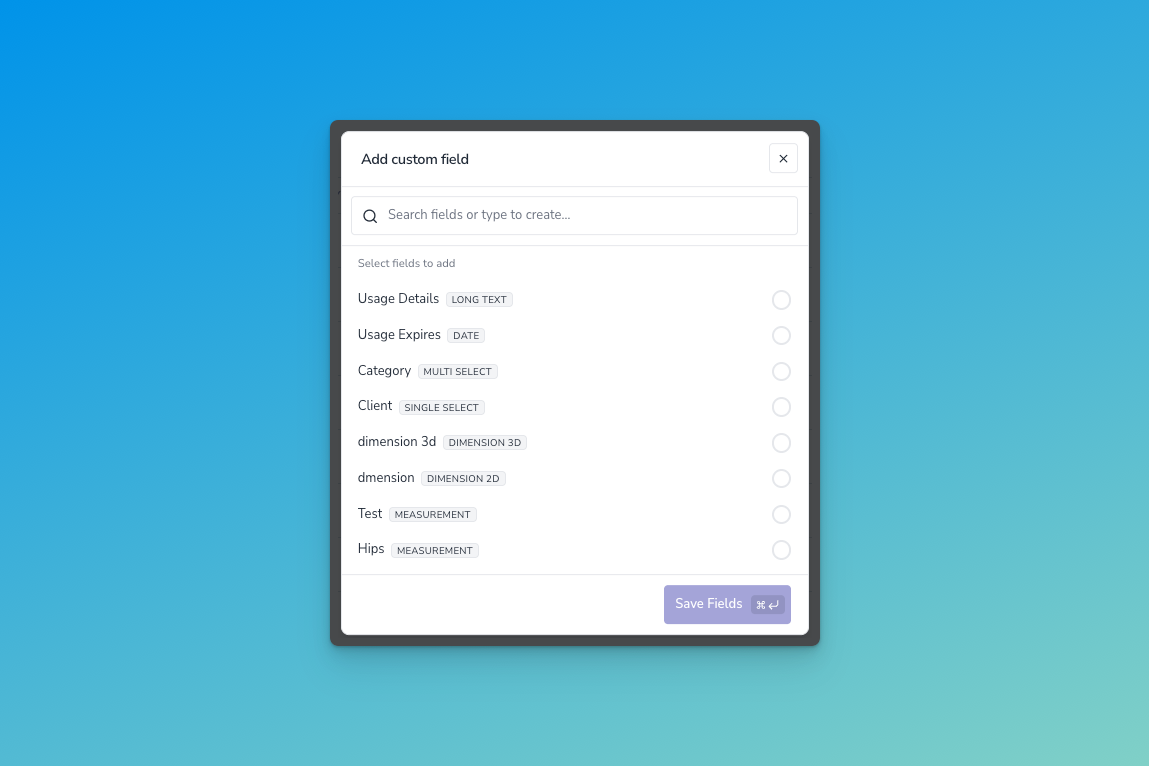
Improved workflow to adding custom fields - We’ve redesigned how you add custom fields to entities. The flow has been designed to prevent users from creating the same fields and guide them toward using fields that allow exist on the platform.
🧰 What’s Fixed
Fixed ability to click websites within table
Fixed issue of certain images not loading in expandable gallery within talent table
Fixed an issue with Callsheet PDF where layouts would not take available space
April 21st, 2026
🧰 What’s Fixed
Social handles not navigating to correct web link if they have a “.”
Improved image optimization within the expandable pinboard table.
April 16th, 2026
🌟 What’s Improved
Expandable talent pinboards on table - Our redesigned table now allows you expand pinboards right within the table.
Table column sizing - We’ve refined how columns resize across main entity tables and how overflow behaves.
🧰 What’s Fixed
Fixed an issue where users could not vote or leave a comment within a shortlist.
April 2nd, 2026
🎁 What’s New
Pronouns - You can now track pronouns as a core field on the system. This will display the pronouns alongside the talent name across the application. We are working with customers to migrate their existing pronoun fields toward the new native feature.
🌟 What’s Improved
Production Ordering in Callsheet Create - You can now ordered a set of productions within the create callsheet workflow to better organize the callsheet beforehand.
Sticky Search / Filters in Callsheet Create - Filter preferences are saved when creating callsheets to save time when creating callsheets across a certain filter set.
Duplicate Role within Production Create - You can now duplicate a role and it’s pre-saved query within the production create workflow. Saving time when adjusting roles required for a production.
Talent Grid View - We have released an improved grid view of talent within the list page.
Email “From” changed to company@atellio.com - To improve the appearance of Atellio emails we have changed the “From” address from “no-reply” to [company name]@atellio.com
Improved Column Layouts for main Entity Tables - We’ve refined how columns expand and resize according to data within.
🧰 What’s Fixed
Fixed an issue where updates to custom field options would hide data in applied entities
Fixed an issue that caused locations to be added multiple times within talent form
Fixed an issue where creating a new group within the talent form wouldn’t save
Fixed an issue where translation keyboards would not focus properly
March 10th, 2026
🎁 What’ New
Public roadmap and feedback board: You can now track feedback / issues as a team using our new support system.
🌟 What’s Improved
Improved filtering within the reconciliation view
Additional design tweaks within the new callout form view
🧰 What’s Fixed
Fixed an issue when adding a personal note within a callsheet
Fixed a round of overflow UI issues across the platform.
⏩ What’s Next
Ability to store and display talent pronouns across the platform
Ability to specify terms and conditions within a callout form
Ability to duplicate a role and it’s contents within a production
Table sizing improvements
Callsheet email improvements
January 31st, 2026
🌟 What’s Improved
New Resource list view and filtering - A better display and filtering experience with more powerful filter options.
Production filtering with custom fields - You can now filter against any specific custom field for productions.
Callout form design - We have redesigned how you add and edit fields within callouts including a sleeker modern design with additional options to customize the public form.
Improved Reconciliation view - We’ve upgraded the look and experience of the Reconciliation list view. Making it easier to aggregate invoices, expenses and reference the talent, booking and production associated.
🧰 What’s Fixed
✅ Fixed an issue of where resource group filtering did not display the correct group options.
✅ Fixed an issue where pressing enter would not save expense values.
✅ Fixed an issue where booking conflicts would not display.
✅ Fixed an issue where team member note would not appear in the callsheet PDF
✅ Fixed an issue where team members could not be ordered within the call sheet.
December 31st, 2025
🎁 What’s New
Multi-Productions on Callsheets - We have built a way to add multiple productions within callsheets. This is our first pass where the Production name is prepended within the group section. It allows you to very quickly get a collection of shoots into one callsheet and edit appropriately. Coming next will be dedicated sections for production to add / edit production name.
🌟 What’s Improved
New Production & Callsheet List Design - A better filtering experience. We'll be rolling out this same experience within the talent list page soon.
Performance Improvements During Peak Times - We’ve upgraded our infrastructure allowing for resources to scale during peak usage. This should help with performance and load times with heavy features such as Calendars and Shortlists.
🧰 What’s Fixed
✅ Fixed an issue where production filters does not persist when page changes.
✅ Fixed an issue where shortlist filtering failed to filter by owner
✅ Fixed an issue where custom single select values were not populating in reports
✅ Fixed an issue where calendar events would jump because of timezone
👀 What’s Next
Improved design to talent list view and filtering
Production filtering with custom fields